Appearance, layout and languages
Settings → Appearance covers the theme, windows, font and language. What appears on the home page, and where, is set in Settings → Home.
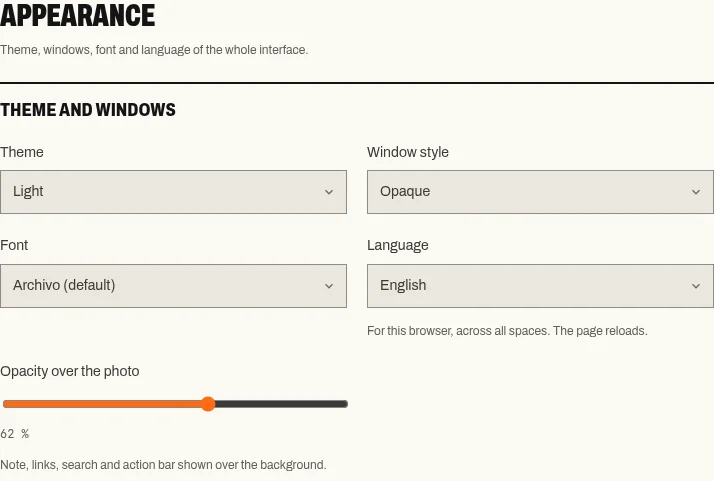
Settings › Appearance.
Theme and windows
Section titled “Theme and windows”- Theme: Same as the system, Light or Dark. It colours the interface, not the photo.
- Window style: Opaque, Translucent or Very translucent.
- Opacity over the photo (20 to 90 %): the opacity of the note, links, search and action bar over the wallpaper.
To make text readable over a bright photo, try Automatic contrast and Darken the wallpaper in Wallpapers first, then the opacity.
| Choice | Font |
|---|---|
| Archivo (default) | Hostux’s typeface |
| System font | Your operating system’s font |
| Highly legible (Atkinson Hyperlegible) | Designed to tell similar characters apart |
| Serif (Literata) | A serif typeface |
The fonts are served with the page; none is loaded from a third party. To enlarge everything, use the browser’s zoom.
Language
Section titled “Language”Language: automatic (the browser’s), French, English, German, Spanish or Italian. The page reloads. Your own text and the quotes are not translated; outside French, the quote Mix switches to the English collections.
Home page layout
Section titled “Home page layout”Settings → Home → On the home page shows or hides the clock, date, greeting, weather, search, quotes, timer, link bar and note in one click. Hiding an item deletes nothing.
- Search goes below the weather, at the top or at the bottom.
- The link bar goes at the top, at the bottom, on the left or on the right; when it is on a side, the note takes the other one.
- On a narrow screen, side lists and the note go back into the Links and notes window.
Action bar
Section titled “Action bar”The bar at the bottom right (Change, Wallpapers, Links, Space once there are two spaces, Settings) can fold away behind the four squares: a click on the squares folds or unfolds it, like the Settings → Home → Action bar setting.
The language and the action bar state apply to the whole browser, across all spaces. The other settings on this page belong to the space.