Wallpapers and image library
The wallpaper is set in the Wallpapers window of the home page (or Settings → Home → Wallpaper → Choose and adjust the wallpaper). The Change button on the home page moves to the next image without touching the settings. All these settings belong to the space.
Sources
Section titled “Sources”| Source | Content |
|---|---|
| Hostux wallpapers, adapted to the time of day | Photos and astronomy images chosen by Hostux, public domain or freely licensed, in four sets: morning, day, evening and night |
| Fixed background or plain colour | An image that never changes, or a colour of your choice |
| My images | Your photos, kept in the browser (see Your images) |
| My images and online wallpapers | Your photos and Wallhaven images, in the share you choose |
| Photos and illustrations (Wallhaven) | The Wallhaven catalogue, by category, or one of your public collections |
| Bing: image of the day | Bing’s image of the day |
| NASA: astronomy picture of the day | NASA’s picture of the day (APOD), with its original English text |
Wallhaven images are limited to general-audience content. Online wallpapers go through the Hostux server, which caches them; if a provider does not answer, the current wallpaper stays.
For Wallhaven, Category offers eighteen themes (Nature and landscapes, Space, City at night…), your Favourite wallpapers or My Wallhaven collection: enter a user name, then Load their collections. Only public collections can be read, up to 120 wallpapers.
Image format (Fitted to my screen or All formats) and Wallpaper colour filter the Wallhaven catalogue; they do not apply to a collection. A photo whose proportions differ from the screen’s is cropped to cover it.
Automatic change
Section titled “Automatic change”Never, Every day, Every new tab, or an interval from 10 minutes to 12 hours. With Never, the wallpaper only changes with Change.
Bing and NASA publish one image a day: with Every day you get today’s; with any other interval, the page also draws on previous days.
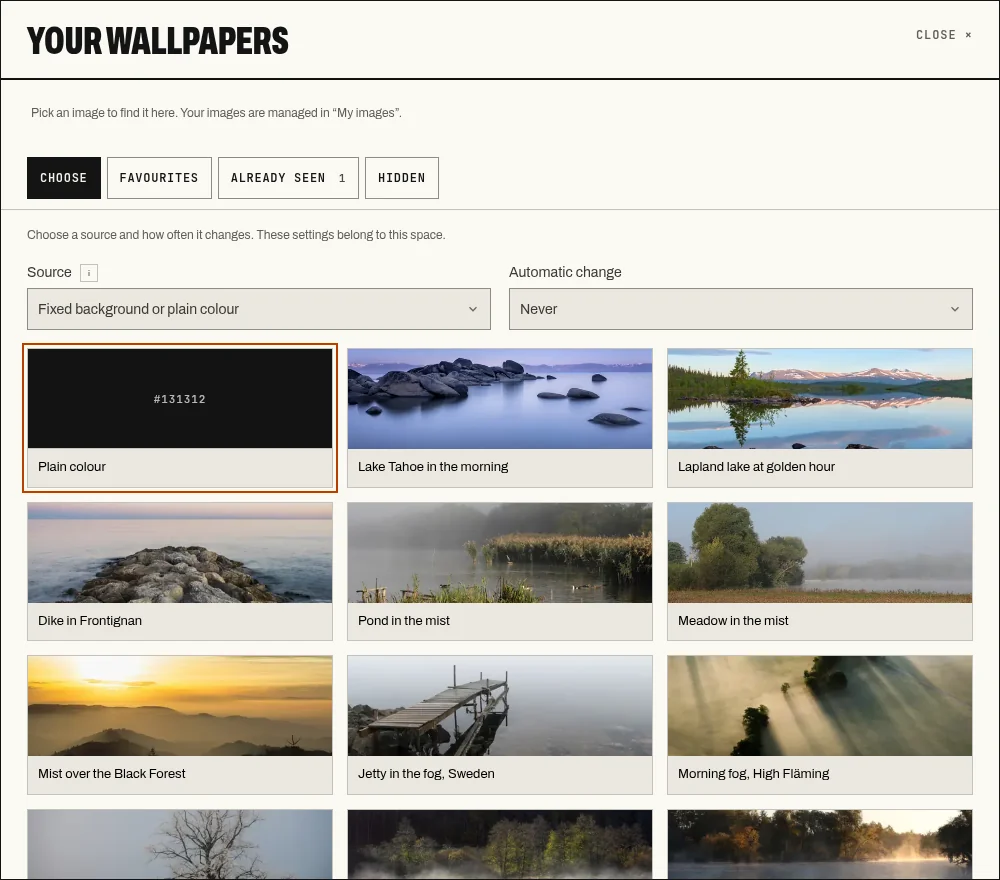
The wallpaper window: source, category and automatic change.
Evenings
Section titled “Evenings”Under Day and night, In the evening, use picks another category (or another plain colour) for the evening. Evening starts:
- At sunset in your main weather city; without a city, from 8 pm to 7 am;
- When the system turns dark, following the light or dark theme of the operating system.
The theme chosen in Settings → Appearance plays no part: only the system preference counts.
Favourites, already seen, hidden
Section titled “Favourites, already seen, hidden”The tabs of the Wallpapers window:
- Favourites: wallpapers marked ☆, two hundred at most. Rotate my favourites uses them as the category.
- Already seen: wallpapers recently shown on this device.
- Hidden: wallpapers set aside with ⊘, which never come back in any rotation. Remove one from the list to see it again.
A favourite points to the image at its provider; it is not a copy of the file.
About this wallpaper gives the author, the licence and the View the source and View the original links.
Readability
Section titled “Readability”Under Text readability:
- Darken the wallpaper lays a veil over the whole image, from 0 to 80 %;
- Automatic contrast darkens only behind text, when the wallpaper is too bright.
Panel opacity is a separate setting, in Appearance. None of these settings changes the image itself.