Sync between browsers
Sync copies a space (settings, links, note, cities, quotes and favourites) between several browsers. Personal images, the list of spaces, note versions and the running timer stay on each device.
It also copies deletions: a link removed on one device disappears from the others. Keep a JSON export on the side.
Two modes
Section titled “Two modes”| Mode | Connects | Goes through |
|---|---|---|
| Sync with a code | The website and the extensions, whatever the browsers | The Hostux server, encrypted in your browser |
| Browser sync (extension only) | Extensions in the same browser, signed in to the same account | The browser’s sync service (Firefox Sync, Google account…) |
Do not turn both on for the same space: each has its own online copy and can replace the space with its own.
Sync with a code
Section titled “Sync with a code”How it works
Section titled “How it works”A code connects one space, and only one. The configuration is encrypted (AES-GCM) in the browser with a key derived from the code, then stored on gist.hostux.net. The server never receives the code and only keeps unreadable data. It therefore cannot recover the code: if you lose it, show it on a device that is still connected (Show the code).
A copy that no device has read or written for a year is deleted from the server.
Connect two browsers
Section titled “Connect two browsers”On the first one:
- Open the space to sync.
- Settings → Spaces and backup → Sync with a code → Create a code.
- Copy the code.
On the second one:
- Open the space that will receive the set-up, or create one. If it holds anything worth keeping, export it first.
- Enter the code under Already have a code?, then Use this code. Spaces and dashes are optional, and case does not matter.
- Confirm: the space’s set-up is replaced by the online copy.
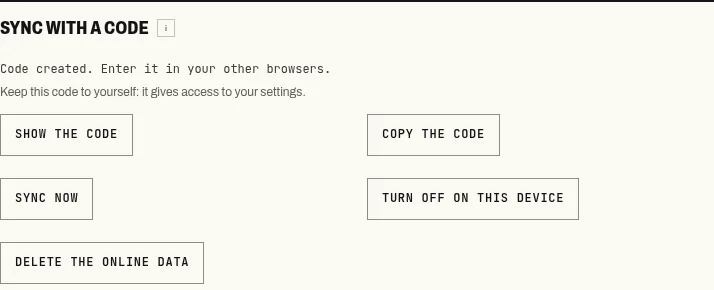
Create a code in the first browser, use it in the second.
From then on, changes go out on their own; Sync now forces an exchange. The server spaces out writes to the same code by twenty seconds.
When both copies have changed
Section titled “When both copies have changed”If both browsers changed the space since the last exchange (one of them offline, for instance), nothing is overwritten. The page shows a sync conflict and two choices:
- Keep and upload this copy replaces the online copy with this device’s;
- Receive remote copy replaces the local space with the online copy.
There is no merge. To keep things from both sides, export the local copy first, choose, then bring back what is missing by hand. A recovery point is created before each copy is received.
An open conflict in the note blocks sync until it is settled.
The code is the key
Section titled “The code is the key”Anyone with the code can read, replace or delete the online copy. It is not in the JSON export.
| Command | Effect |
|---|---|
| Turn off on this device | This device forgets the code and keeps its settings. The online copy and the other devices do not change. |
| Delete the online data | Deletes the online copy, after confirmation, and makes the code unusable for good. Each device keeps its settings. |
After a deletion, the server refuses that code forever: no reading, no new copy. Other devices still connected forget it at their next exchange and show “This code was deleted”. If the copy server does not answer at the time of deletion, the code is refused all the same and the copy is erased during the daily clean-up.
If the code has leaked, Delete the online data, then Create a code on one device and Use this code on the others. Data someone else has already read cannot be taken back.
Browser sync
Section titled “Browser sync”In the extension, Turn on sync uses storage.sync, the browser’s sync service. The browser account and extension sync must be on. On the first connection, choose Receive browser settings or Replace with this device’s settings.
This mode only connects extensions in the same browser: not Firefox with Chrome, and not the extension with the website. In practice it only serves the main space: other spaces have a different identifier on each device and never meet. Data follows the browser’s rules and quotas; a set-up that is too large may be refused, in which case the JSON export is the way to move it.